Google Shopping ads guide: from Merchant Center to your first profitable campaign
This guide is for store owners who want their products at the top of Google, with a photo and a price, above every text ad. It follows the order the work actually happens in: site, Merchant Center, feed, purchase tracking, first campaign. No advanced strategy. Only what has to be right before you spend the first dollar.
Use the contents to jump to what you need. The yellow notes along the way are the steps people skip most, and pay for later.

What Google Shopping is, and how it differs from Search ads
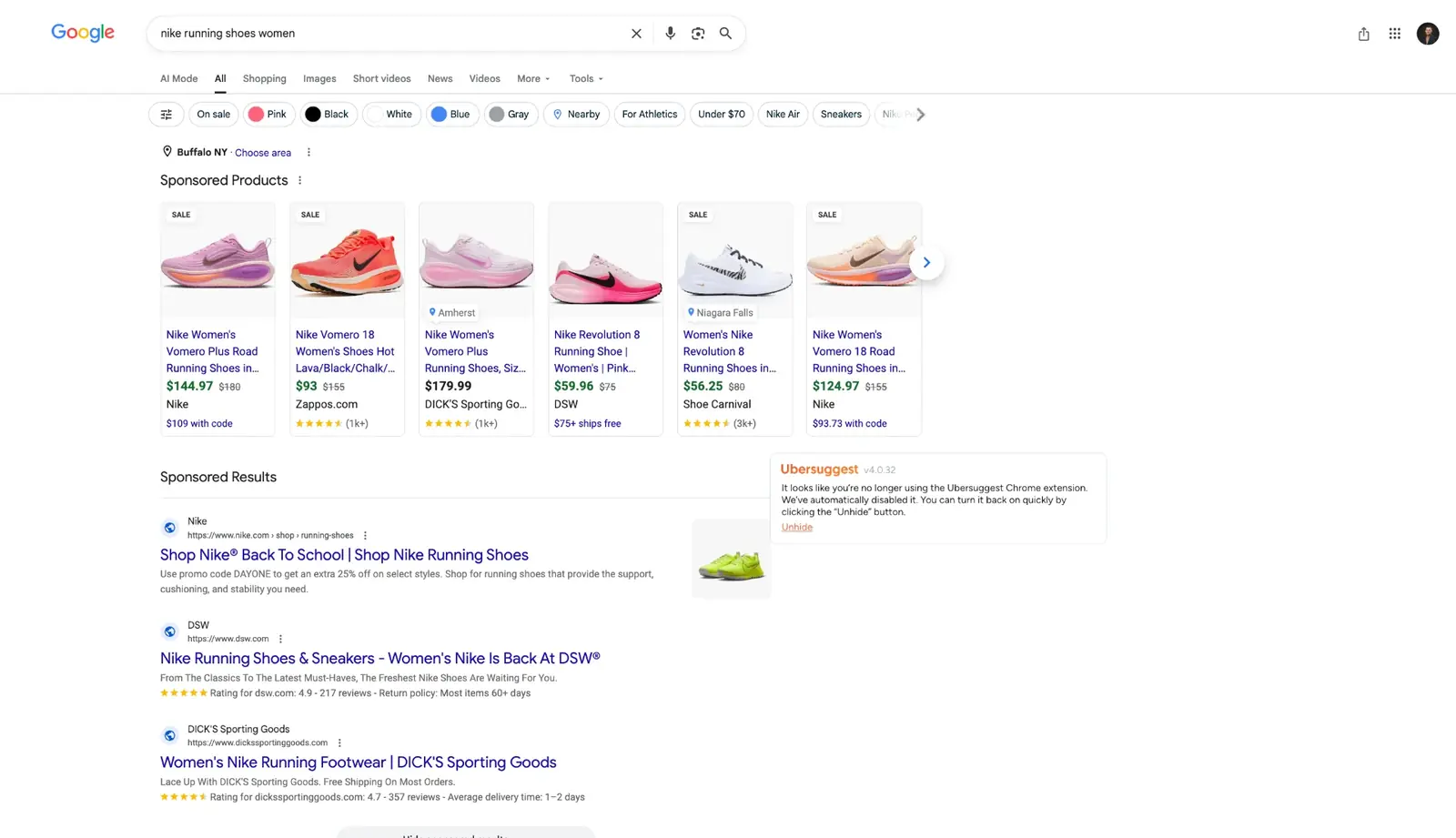
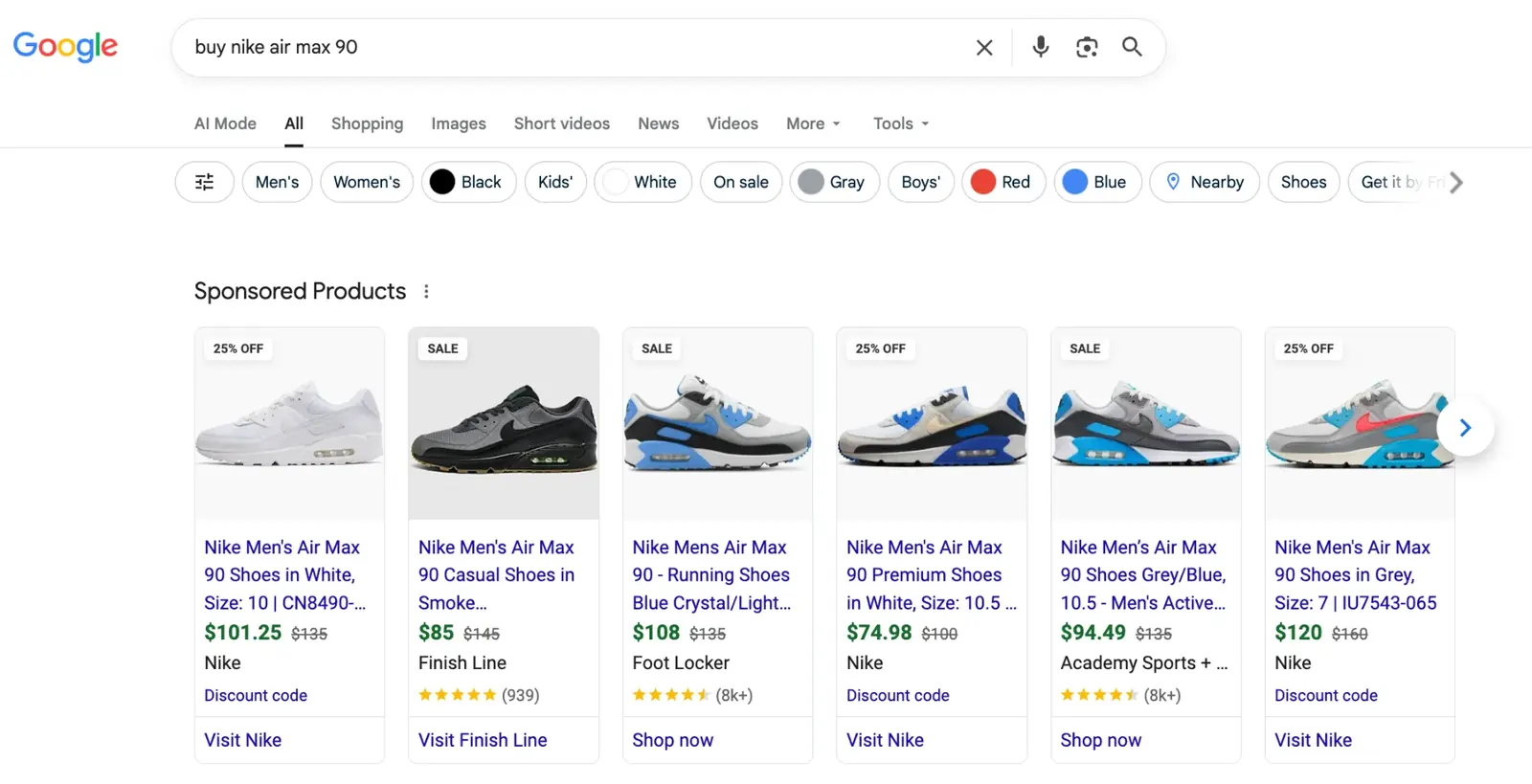
A Shopping ad is a product photo, a name, a price and your store name, shown before the buyer opens a single website. The buyer compares five offers in two seconds and clicks the one that fits.
The big difference from a Search ad: you do not write a Shopping ad. Google builds it from your product feed. There are no keywords to pick and no ad copy. Google decides which searches your product is relevant for by reading the title, description, category and the rest of the feed.
So Shopping is a data game. With a bad feed you do not lose the auction. You are not in it.
There is a second effect. Someone who clicks a Shopping ad has already seen the photo and the price. Half the decision is made before the click, which is why Shopping traffic usually sits closer to a purchase than text ad traffic.
Think of it as a mall with a strict manager
You want a shelf at the entrance of the biggest mall in the country. The manager never visits your shop. He reads the stock list you hand in and checks your papers. If everything is in order, you get the shelf. If not, the stock goes to the warehouse, even if it is better than anything else in the building.
| Mall | Your account | What it means |
|---|---|---|
| The shop | Your website | Looks like a real business: policies, contact details, prices that match. |
| The papers | Merchant Center | Who you are, where you ship, how returns work. |
| The stock list | The feed | One row per product: title, price, image, availability, barcode. |
| The shelf | The campaign | You only pay for the shelf once everything above is in order. |
Most store owners start with the campaign. You can have a perfect campaign and a useless feed and never see a click. This guide goes in the order that works.
Is Shopping for you?
| Situation | Answer |
|---|---|
| You sell physical products, have a site with a cart, clear prices, shipping and returns | Yes. Work through the guide in order. |
| The site is unfinished, policy pages are missing or contact details differ between pages | Not yet. Start with chapter 1. |
| You sell a service (appointments, repairs, consulting) | No. Shopping shows products, not services. |
| You sell pharmaceuticals, supplements with health claims or adult products | Check the policy for each country first. These categories carry the most restrictions. |
Before Merchant Center: a site that passes review
When you submit an account, someone at Google (or a system) opens your site and decides within minutes whether you look like a real business. Design does not matter. What matters is whether the details match and whether a buyer can reach you when something goes wrong.
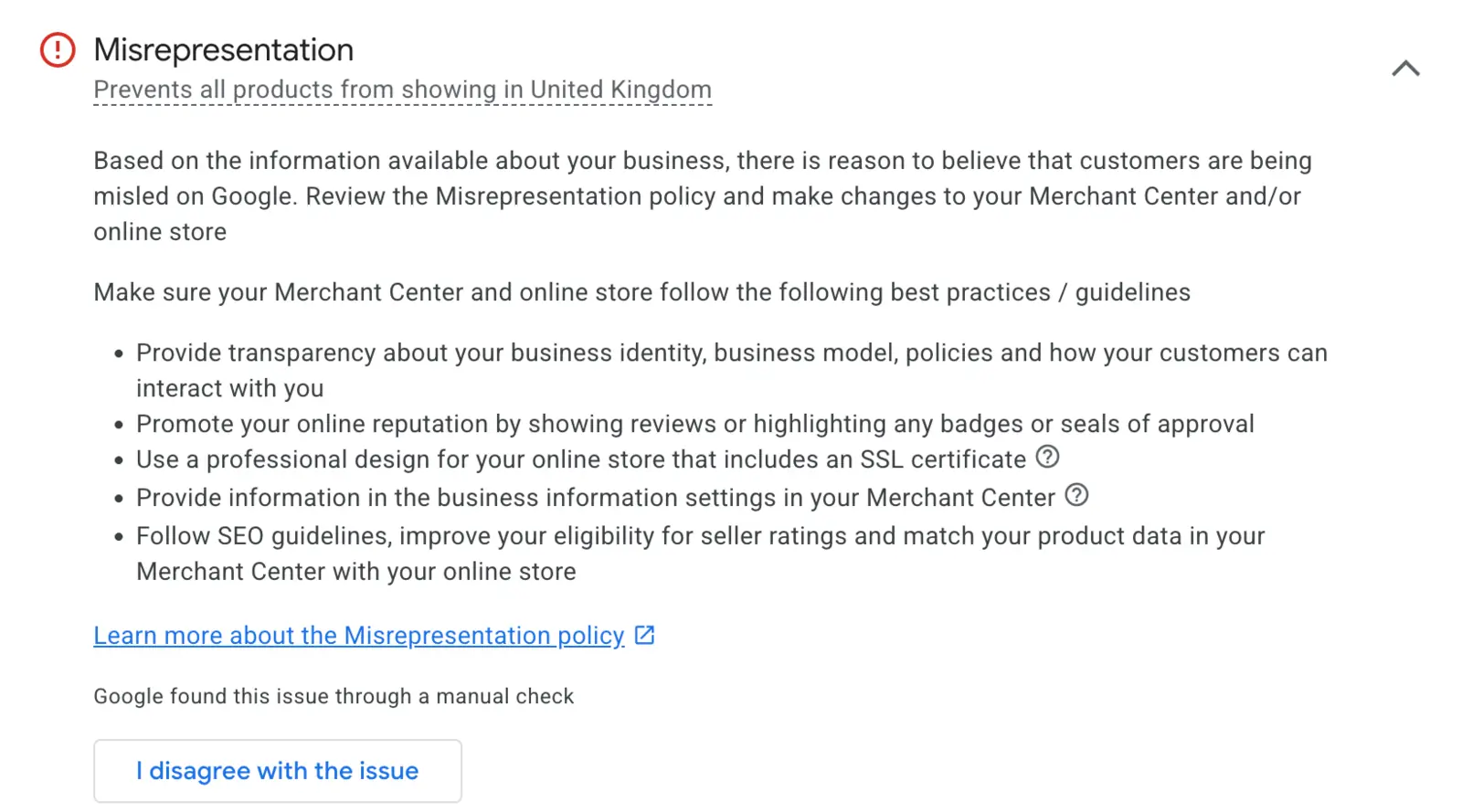
The biggest reason for suspension is misrepresentation: Google thinks you present yourself as someone you are not, or promise something you do not deliver. It is rarely fraud. It is usually a forgotten detail.
One account I worked on started from a purchased theme. In the privacy policy, in the middle of the cookie section, sat another company’s email address. Nobody noticed it for years. Google did.
What the site needs
- HTTPS with no browser warnings.
- A contact page with a full street address, a phone number that gets answered and a business email on your own domain. At least two ways to reach you.
- The same business name everywhere: header, footer, terms, contact page and later Merchant Center.
- An About page that sounds like you, not a template.
- Policy pages in the footer: privacy, shipping, returns, payment and terms, all with your details.
- Shipping with a specific time and cost, not “contact us for details”.
- Returns with a window in days, who pays return shipping and whether there is a restocking fee. If there is none, say so.
- Payment methods that match between checkout and the payment page.
- Links that work. I have seen a site where three different “contact us” links all led to a 404.
- Collections with real stock. A collection with two products looks like an abandoned shop.
- A fast mobile site. Check it in PageSpeed Insights.
The full list, with examples and a printable PDF, is in Merchant Center: what has to match (Serbian, the checklist itself is universal). For a quick automated check, try gmcscout.com.
Setting up Merchant Center
Merchant Center (merchants.google.com) is where you hand Google your papers and your stock list. It is free. Open it with the Google account you already use for Google Ads, which makes linking easier later.

2.1 Business information
Business name, address, phone and customer email. Everything must match the site exactly: same address format, same phone number, same name.
2.2 Verify and claim your website
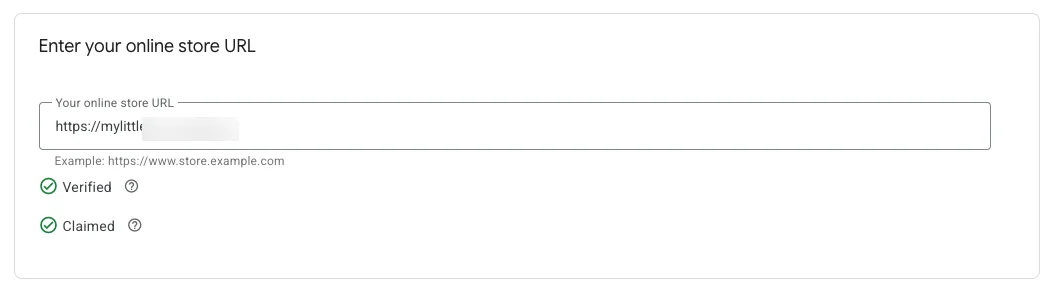
Google needs proof the site is yours. You verify it, then claim it. On Shopify this usually happens when you connect the Google & YouTube app. Elsewhere you add an HTML tag or use Google Analytics or Tag Manager.
A common trap: everything looks done, but the site was never claimed. If it shows as claimed by another account (an old agency, an old login), release it there first.
2.3 Shipping
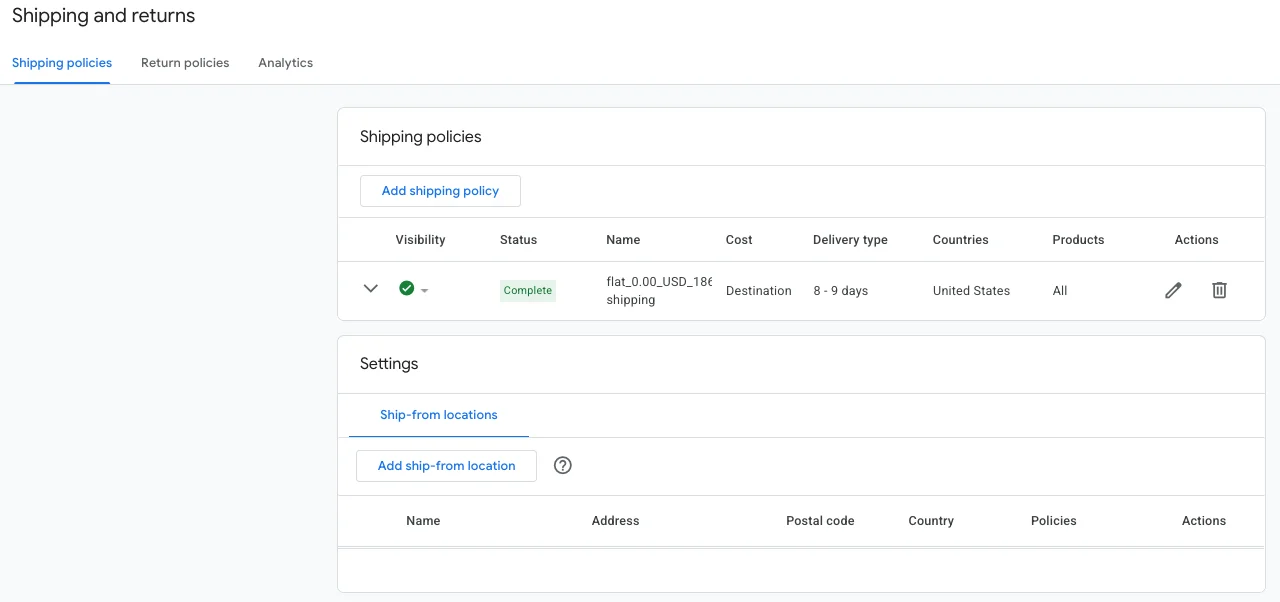
Without shipping settings, products stay pending and never enter the auction. Under Shipping and returns you add a rule per country: cost (free, flat, by basket value or weight) and timing (handling plus transit). The cost and timing must match the site.
2.4 Returns
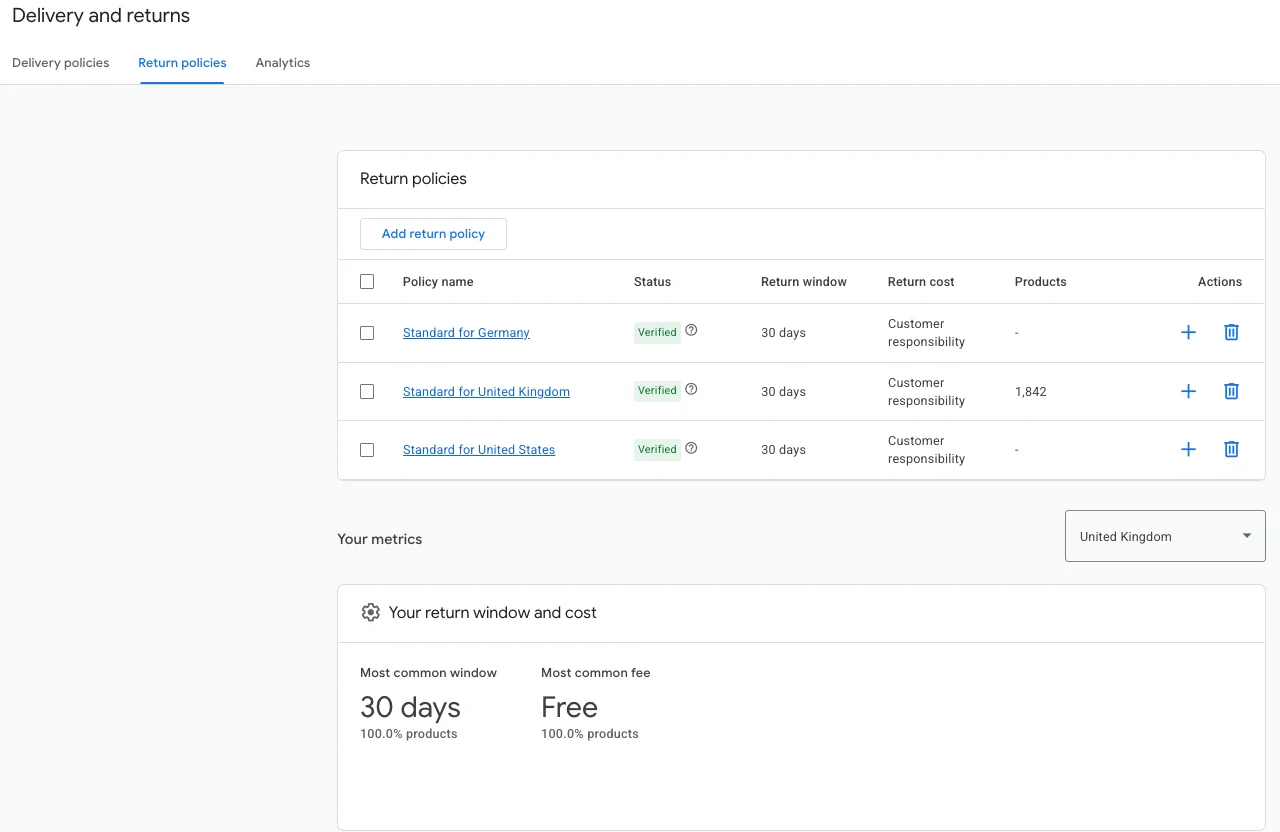
Add a return policy for each country you ship to: link to the policy page, the window in days, who pays return shipping, any fee and how fast you refund. The window must match the site.
2.5 Account review, and what to do about a suspension
According to Google’s documentation, account review usually takes up to 7 business days, longer for complex cases.
If a suspension arrives, you do not get a list of what to fix. You get a generic message.
My advice: do not request a new review right away. Go through the whole site with the list from chapter 1, write down what you changed, then request a review. Every request with an unfixed problem only extends the wait.
The feed: the stock list Google reads
The feed is a table of all your products. One row per product (and per variant), one column per attribute. This is the most important chapter in the guide. A campaign cannot fix a bad feed. A good feed can carry a weak campaign.

3.1 Where the feed comes from
| Platform | How you get a feed |
|---|---|
| Shopify | The free Google & YouTube app. Created and refreshed automatically. |
| WooCommerce | A plugin such as Product Feed PRO or CTX Feed, both with free versions. |
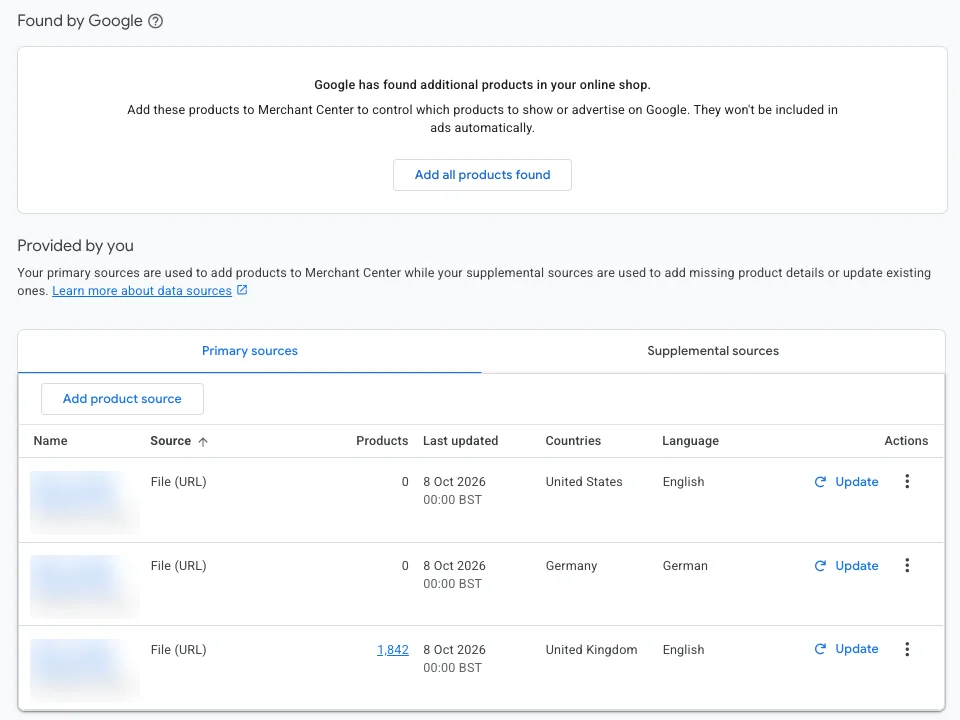
| Small catalog, no platform | Google Sheets as a data source in Merchant Center. |
| Large catalog or several markets | A feed tool: Simprosys, Channable or DataFeedWatch. |
3.2 Required attributes (no approval without them)
| Attribute | What it is | Watch for |
|---|---|---|
| id | Unique product ID | Never change it later. Google keeps history by ID. |
| title | Product title | Up to 150 characters. More in 3.4. |
| description | Description | Up to 5,000 characters. No promo text, no all caps. |
| link | Product page | Must load and show the same product and price. |
| image_link | Main image | Clean background, no logo, watermark or text. |
| availability | Stock status | in_stock, out_of_stock, preorder or backorder. It must be true. |
| price | Price with currency | Identical to the site. |
| brand | Brand | Required for most products, even your own brand. |
| condition | Condition | new, used or refurbished. |
Fix order: availability and price first (that is where misrepresentation starts), then title, then barcode, then everything else. Not all at once.
3.3 Attributes that win auctions
- gtin (barcode). If you resell other brands, treat it as required. Without it there is no error message, you just quietly get fewer impressions.
- identifier_exists. Own-brand or handmade products without a barcode get “no” here. Never invent a GTIN. Leaving both empty is the worst option.
- google_product_category. If you skip it, Google guesses, and often guesses wrong.
- product_type. Your own categories, the way you split the range. You will split campaigns by it later.
- item_group_id. The same shirt in three sizes shares one item_group_id with different ids. Without it, variants look like duplicates.
- color, size, gender, age_group. Required for apparel, useful everywhere.
- additional_image_link, sale_price, product_highlight and product_detail. Google uses the last two more and more for AI-driven recommendations.
A feed has over 60 possible attributes. You seriously use ten to fifteen.
3.4 Product titles: the cheapest optimization in Shopping
The title is where Google decides which searches you match. A weak title cannot win the auction no matter how high you bid.
People search in three ways: by problem (hair loss), by solution (hair growth shampoo) and by ingredient (caffeine shampoo). Ingredient searchers are usually closest to buying. A title that covers all three catches five searches instead of one.
A formula that works for most products: product type + problem or benefit + key feature + who it is for + variant (color, size, quantity) + brand. A strong brand goes first. An unknown brand goes last, because nobody types a name they do not know.
- You have 150 characters, but Google reads the first 70 hardest. Put what matters first.
- No “sale”, “cheapest”, “free shipping” or all caps. That gets disapproved.
- Do not copy the SEO title from the product page. They do different jobs.
An hour of work on your bestsellers. Almost nobody does it, which is exactly why it works.
3.5 Images
Main image: the product on a clean, usually white background, with no logo, watermark, border or promo text. Google lists 500×500 px as the minimum. Around 1200×1200 looks better on every screen. Additional images can show the product in use.
The image filters buyers before the click. On a football gear account we tested three main images: a black background, the product turned around, and a player in close-up. The player won, with a 24% lower cost per purchase and 59% more purchases. Same product, same price, different photo.
3.6 Custom labels: segmentation the buyer never sees
Custom labels are five free fields (custom_label_0 to custom_label_4) for whatever you need to split products in campaigns. Buyers never see them. This is the difference between a structure that describes the store (categories) and one that describes the business (profit).
| Field | What goes in | Example values |
|---|---|---|
| custom_label_0 | Margin | high, medium, low |
| custom_label_1 | Performance | heroes, zombies, villains (filled later, from results) |
| custom_label_2 | Season | winter, summer, all year |
| custom_label_3 | Price band | under $30, $30 to $100, over $100 |
| custom_label_4 | Free for tests | new, bundle, outlet |
Fill at least margin and price band before your first campaign. A month later, when you want to separate products that earn from products that only spend, the label is already there.
3.7 Supplemental feeds: fixes without touching the store
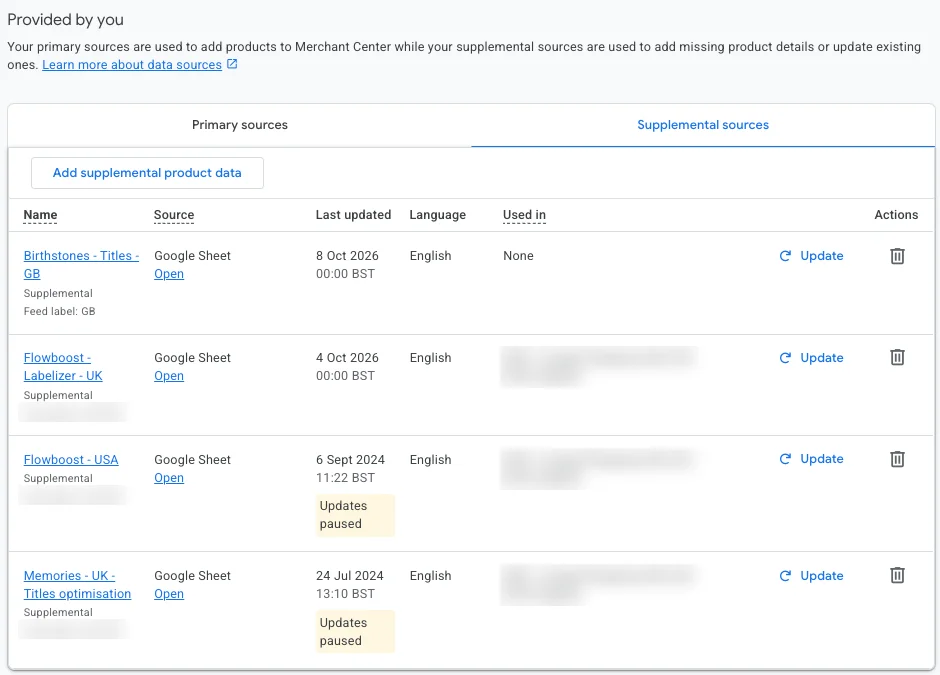
You do not edit the main feed to fix 20 products. You make a Google Sheet with an id column plus the columns you want to change (title, custom_label_0, gtin) and add it in Merchant Center as a supplemental source. Google merges by ID and your values override the main feed.
Setup takes about half an hour. Changes show after the next refresh, so check the next day. A supplemental feed changes existing products. It does not add new ones.
Diagnostics and disapproved products
Once the feed is in, Google checks every product and gives it a status: approved, limited, disapproved or pending. You see it all under Products, with a list of issues and how many products each affects.
Common issues and what they mean
| Message | What it means | What to do |
|---|---|---|
| Mismatched product price | Feed price is not the site price | Check discounts, currency, VAT and feed refresh timing. |
| Landing page not working | Google cannot open the page | Check the links, and that the server does not block Googlebot. |
| Missing shipping | No shipping rule for that country | Chapter 2.3. |
| Missing GTIN / identifier | No barcode or identifier_exists | Chapter 3.3. |
| Image too small / promotional overlay | Image too small or has text | Chapter 3.5. |
| Misrepresentation | The account does not look trustworthy | Chapter 1, the whole list. |
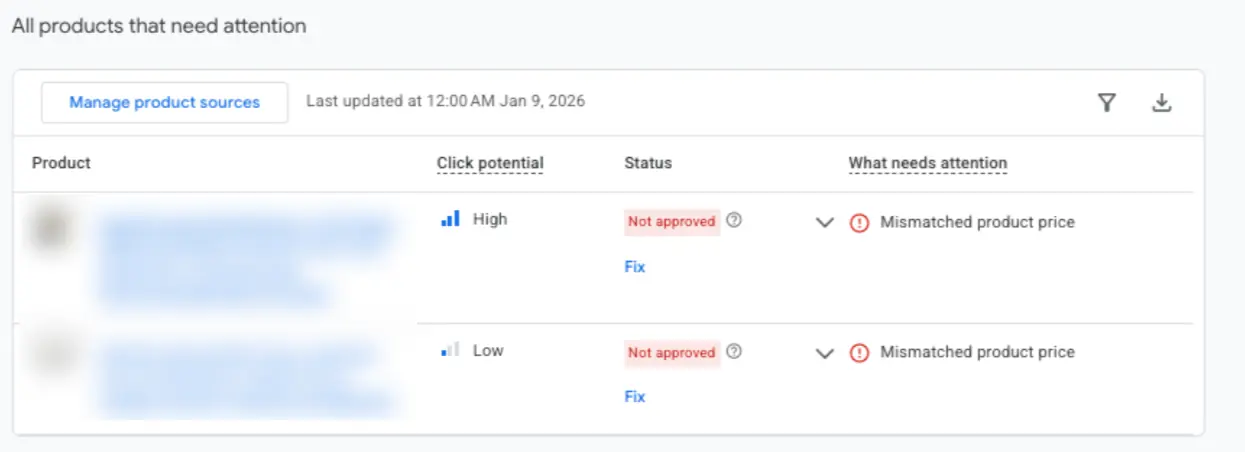
What breaks in real accounts
- 329 products flagged as “landing page not working”. The pages worked fine in a browser. The server was auto-blocking Google’s crawler as a suspected attack, so Google saw 404s and switched off half the catalog.
- 1,119 reviews on the site, 193 in Merchant Center. A broken sync was quietly suppressing a ranking signal nobody thought to check.
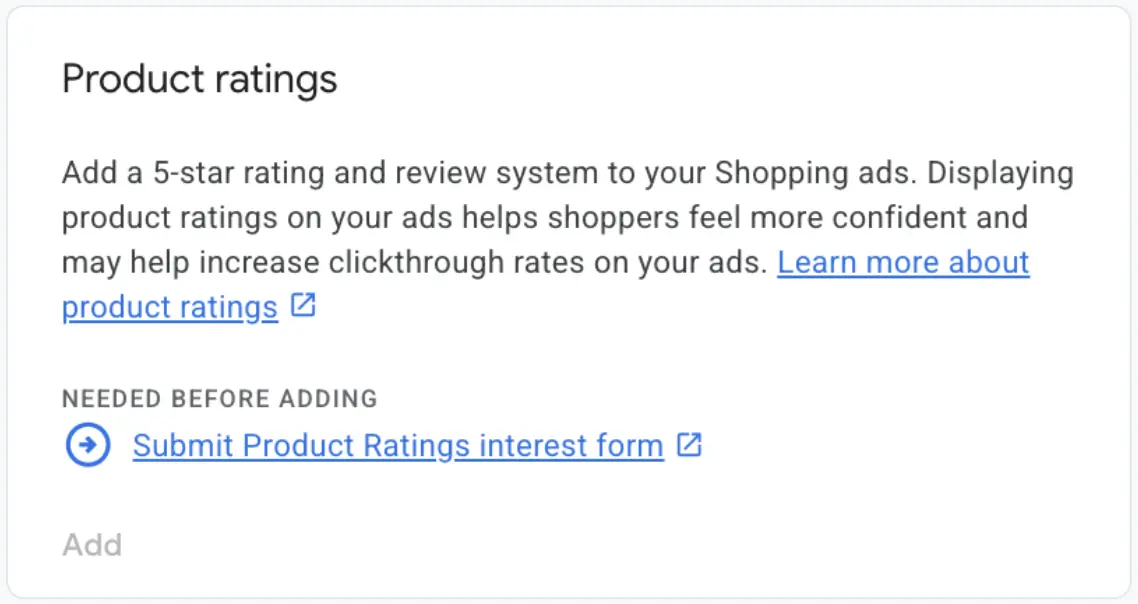
- Product ratings never activated. The client assumed stars were showing. The program had never been submitted. Competitors had stars and they did not.
- A suspension that kept coming back. Several small mismatches at once: a wrong email in the policy pages, an address that did not match, contact details that differed between pages.
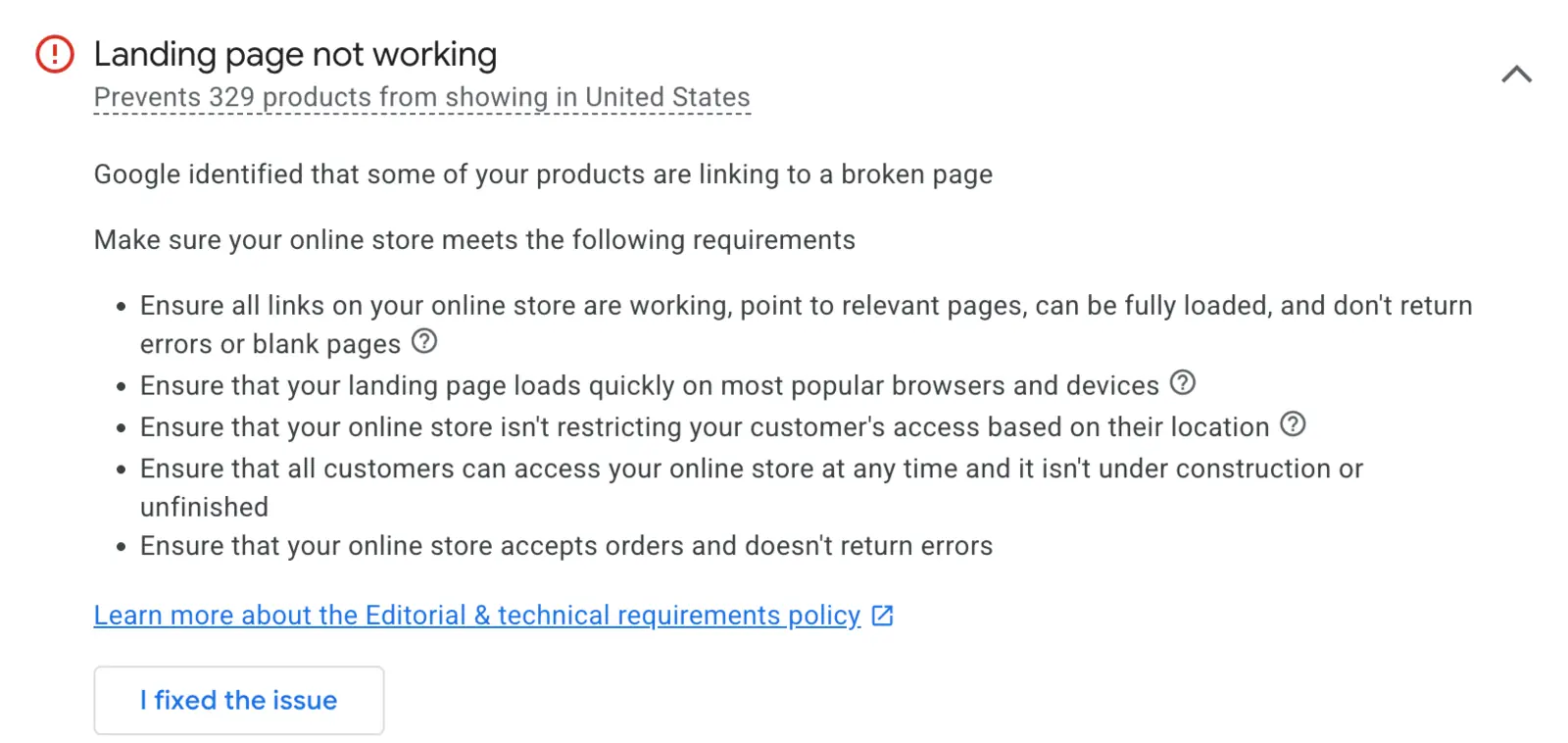
The 5-minute weekly check
Merchant Center problems are the most common reason Shopping never reaches its potential. Not bidding. Not budget. The feed.
Once a week, open diagnostics and look at three things: how many products are disapproved, whether a new issue appeared, and whether any issue hits a bestseller. I have seen an account where someone spent three weeks tuning bids while 400 products sat disapproved.
Before you submit a feed, run it through my free GMC feed audit. The file is processed in your browser and never sent to a server.
Linking Google Ads and tracking purchases
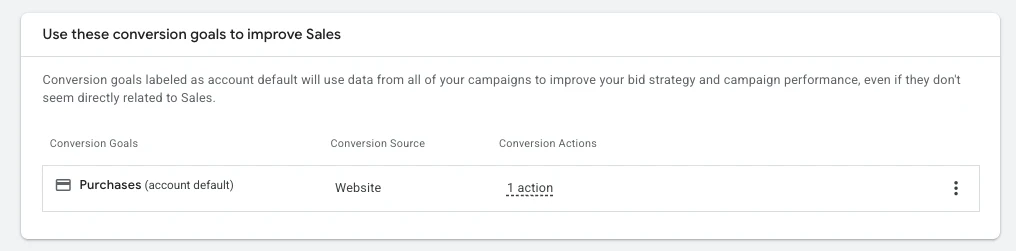
Merchant Center holds the products. Google Ads shows them and charges for clicks. You link the two, and then Google Ads needs to know when someone buys.
5.1 Linking the accounts
In Merchant Center settings, under apps and services, add your Google Ads account. If you are admin on both, the link is approved instantly. If not, the Google Ads admin accepts the request inside Google Ads.
5.2 Purchase tracking: without it, Google bids blind
Google Ads learns from purchases. If it measures them wrong, it learns the wrong lessons and spends on the wrong clicks. Smart bidding is only as smart as the signal it gets.
- The primary conversion is Purchase only, with the order value. Add to cart and begin checkout can be tracked as secondary conversions, never primary.
- Google Tag Manager as the one place for all tracking code.
- GA4 to analyze behavior and cross-check. If purchases in GA4 and Google Ads differ by more than 20%, something is broken.
- Turn on enhanced conversions in Google Ads.
- Server-side tracking (TrackBee, ProfitMetrics) makes sense once budget grows and browser tracking starts losing purchases.
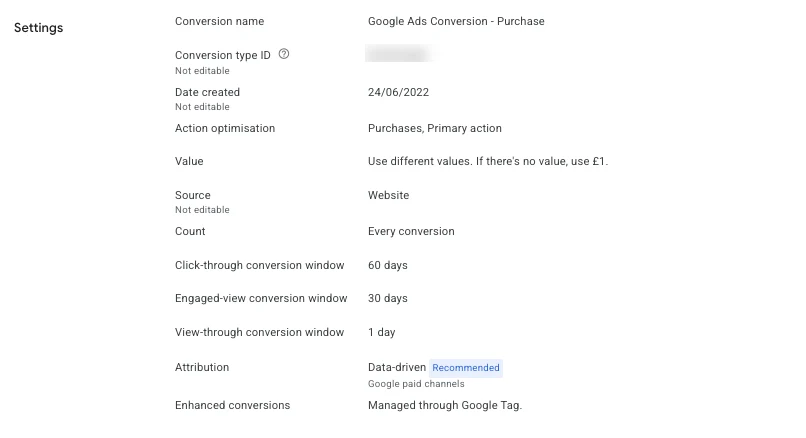
Before the first campaign, place one test order and check it appears in Google Ads with the correct value. Ten minutes that save you a month of wrong decisions. If your dashboard looks healthy while the bank account disagrees, read the three silent ways conversion tracking breaks.
Your first Shopping campaign
If chapters 1 to 5 are done, the campaign is the easy part. That is why it comes last.
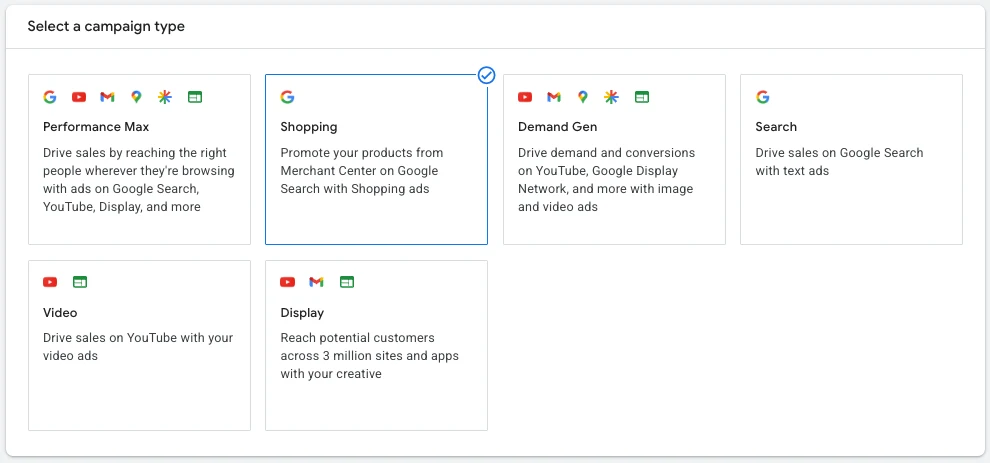
6.1 Standard Shopping or Performance Max
Google will push Performance Max in the interface. For a start I recommend Standard Shopping for one reason: you can see what happens. You see which searches you show for, which products spend and which sell.
PMax comes later, once the account has sales history and you know which products make money. A rough line: until you have steady daily sales, stay on Standard Shopping.
6.2 Before you click: work out breakeven
Breakeven ROAS is the revenue to ad spend ratio where you neither earn nor lose. It is 1 divided by your gross margin.
| Gross margin | Breakeven ROAS | Meaning |
|---|---|---|
| 50% | 2.0 | $2 of revenue for every $1 of ads |
| 40% | 2.5 | $2.50 of revenue for every $1 of ads |
| 30% | 3.33 | $3.33 of revenue for every $1 of ads |
Without this number you cannot tell whether a campaign is good or just looks good. Run yours in the breakeven ROAS calculator.
6.3 Structure: one basket lies
The most common mistake is one campaign with every product in it. When a $20 bracelet and a $300 set share one campaign and one bid, the average lies about both.
- Separate brand searches from the rest. Searches with your store name almost always perform well and flatter the average.
- Group products by similar price and margin, using product_type or the custom labels from chapter 3.
- A group that hits its targets earns its own campaign. You do not build ten campaigns on day one. You launch one or two, watch, then split.
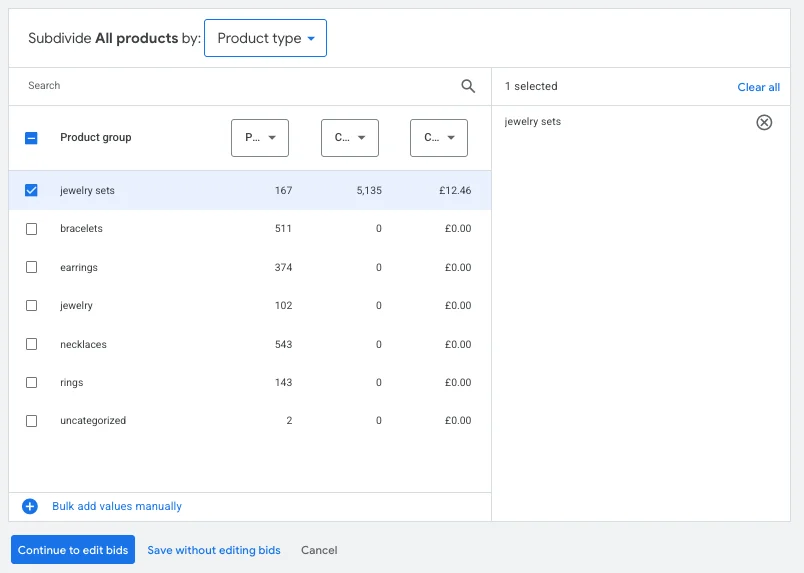
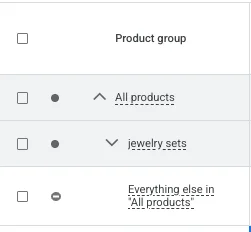
This is where people slip: after the split, Google creates a group called “Everything else in All products”. If you do not exclude it, every product you did not pull out keeps bidding in the same campaign. You split the basket and left it open. Click that group and choose Exclude.
6.4 Bidding at launch
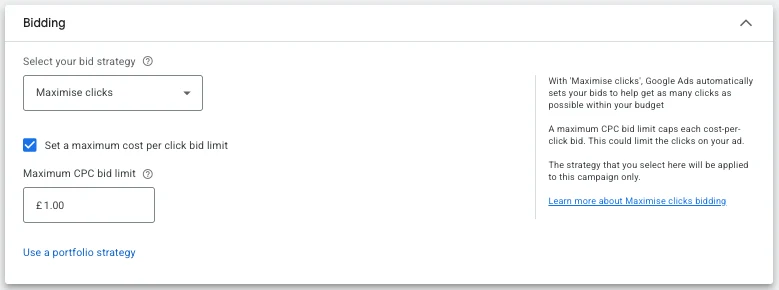
A new account has no history and Google has nothing to learn from. So at launch you use Maximize clicks with a max CPC limit. It is not the timid choice. It is the right one while there is no data.
Once the campaign collects enough purchases (around 30 a month), move to value-based bidding with Target ROAS. Set the target close to what the campaign already achieves and judge it after at least two weeks. This is my default, not a law: on some accounts I test from day one, as in this experiment.
6.5 Settings people skip
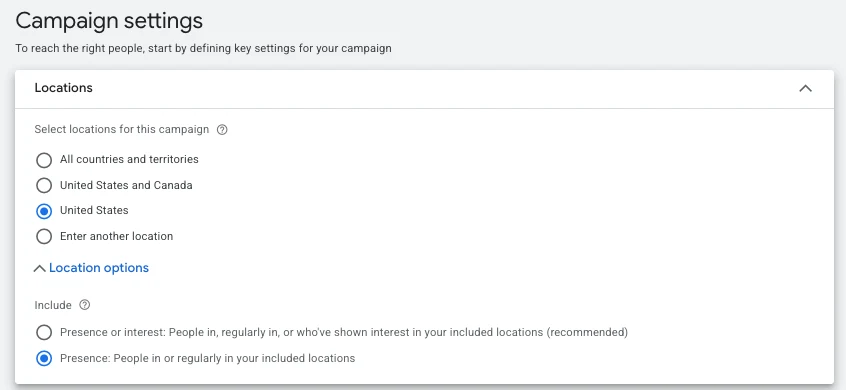
- Location: only the countries you actually ship to, with “Presence”, not “Presence or interest”.
- Negative keywords from day one, kept in shared lists: jobs, salary, free, how to make, used (if you do not sell used), competitors you do not want.
- Campaign priority: with several Shopping campaigns on the same products, the highest priority bids first even when a lower one has a higher bid. For your first campaign, leave it on Low.
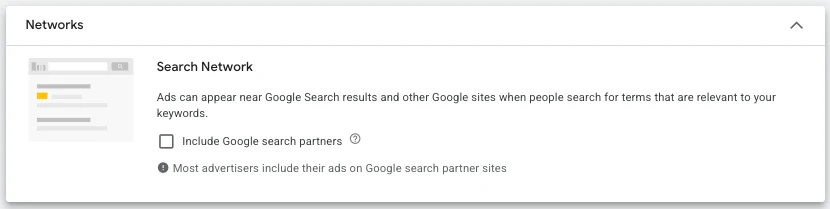
- Networks: for your first Standard Shopping campaign, untick search partners until you see results on Google itself.
- Customer acquisition and retention: leave both unticked for now.
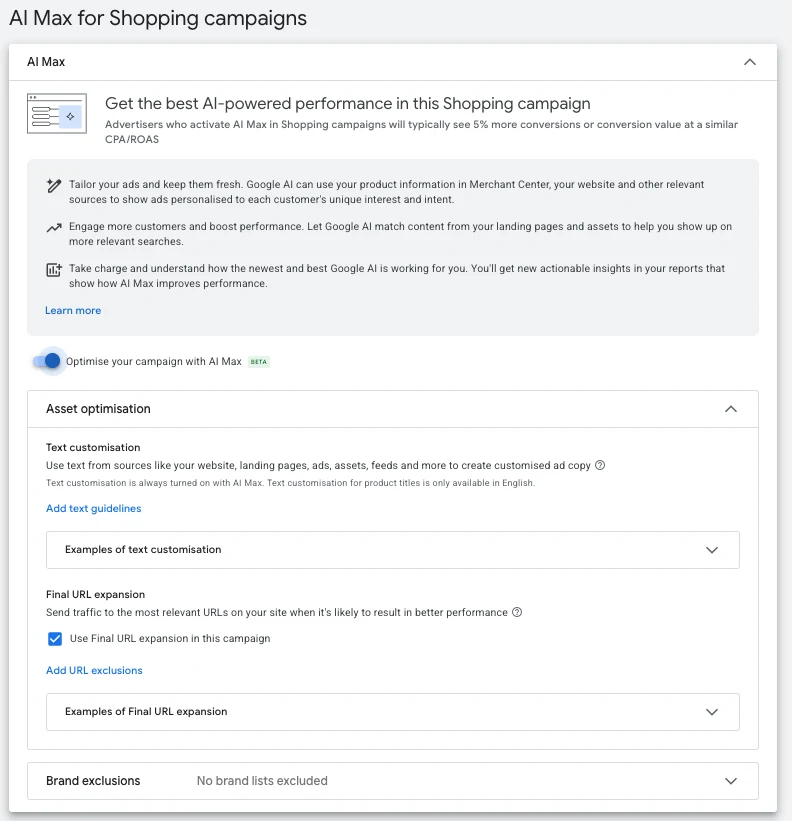
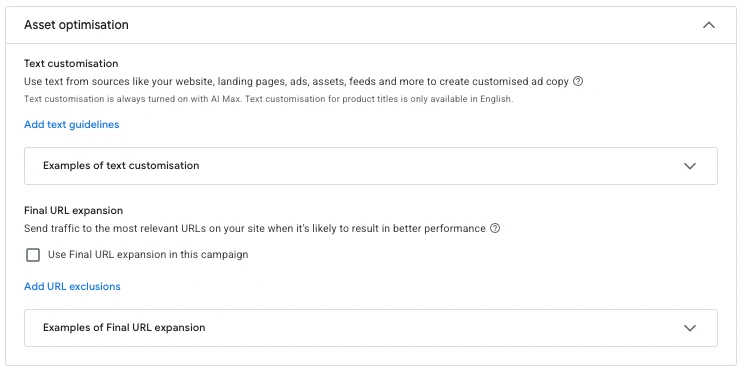
6.6 AI Max: off for your first campaign
At the end of setup Google offers AI Max, already switched on. It writes ad text from your site and picks the landing page itself. Sounds handy. The problem is that you no longer know what your feed did and what Google did. Switch it off for the first campaign. You want a clean read: your products, your titles, your pages.
The first 30 days: what to watch
The biggest mistake in month one is touching too much. One change, one week, then look.
| When | What you look at | What you do |
|---|---|---|
| First 3 days | Products serving and purchases being tracked | Nothing, unless something is broken. |
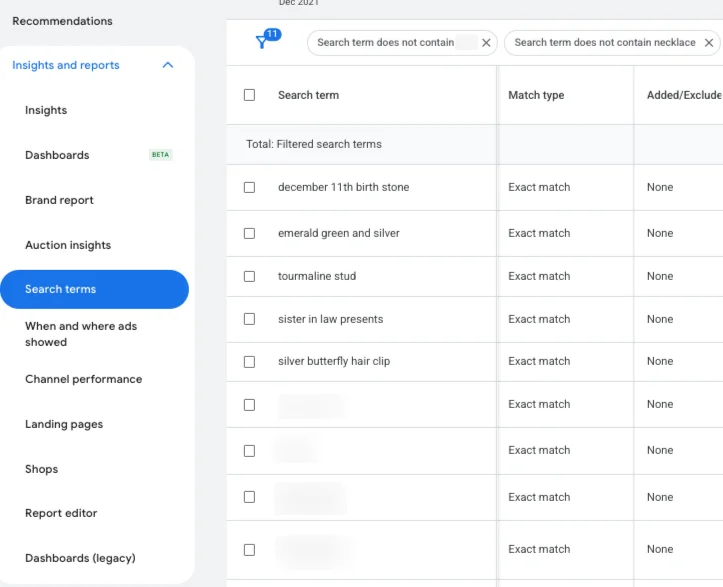
| Every week | Search terms report | Add negatives for searches that do not sell. |
| Every week | Merchant Center diagnostics | Fix new disapprovals, bestsellers first. |
| Every week | Products that spend without selling | Check title, price and image before excluding them. |
| After 2 to 4 weeks | Purchases and ROAS by product group | Move a group that works into its own campaign. |
| Around 30 purchases a month | Stable results | Consider Target ROAS. |
What you do not do in month one: launch PMax with every asset, YouTube and Demand Gen. Steady sales first, then expansion.
Google Shopping questions
How long does Merchant Center account review take?
According to Google, usually up to 7 business days, longer for complex cases.
Why are my products pending?
Most often there is no shipping rule for the target country, or the feed review is still running. Check Shipping and returns in Merchant Center.
What if my products have no barcode (GTIN)?
If they are your own or handmade, set identifier_exists to “no”. Never invent a GTIN, it leads to disapproval. If you resell another brand, get the GTIN from the supplier.
I use Shopify or WooCommerce. Does the feed not work on its own?
The platform builds a feed, but it sends the data exactly as it is in the store. Titles, barcodes, categories and prices go through unchecked. That is where most problems start.
Standard Shopping or Performance Max to start?
Standard Shopping, because you see the searches and the products. PMax makes sense once the account has steady sales and history.
Which bid strategy for a new account?
Maximize clicks with a max CPC limit. Around 30 purchases a month, move to Target ROAS.
How do I change titles without editing the store?
With a supplemental feed in Google Sheets. Values in the sheet override the main feed by product ID.
What is misrepresentation and how do I avoid it?
A suspension when Google decides the account does not look trustworthy. Usually mismatched prices, unclear shipping, inconsistent contact details or a copied template. The checklist is in chapter 1.
If you made it this far, you know more about Shopping than most people who offer to set it up for you. Start with chapter 1 and do not skip the order.
If you want the whole list in one place, get the Shopping checklist. If your account is already live and not doing what it should, start with a Written Account Diagnosis. If you want me to run it, see Google Ads for eCommerce.
Steph